


Why migrating from Delphi is relevant today
Many companies continue to rely on Delphi-based systems developed years ago. While these systems still operate, they increasingly introduce strategic, technical, and operational risks. Today, Delphi to C# migration relevance is driven by the following challenges
-
Shrinking talent pool and knowledge risk
Delphi expertise is scarce and declining, increasing dependency on a few key developers and raising maintenance and continuity risks
![Card image]()
-
Legacy architecture and integration limitations
Most Delphi systems were built as monoliths and are poorly suited for modern architectures, making integrations complex and costly
![Card image]()
-
Rising maintenance costs and technical debt
Ongoing maintenance, fixes, and changes in legacy Delphi applications require growing effort and result in higher total cost of ownership
![Card image]()
-
Security, compliance, and stability risks
Older environments receive fewer updates, increasing security exposure and making compliance and system reliability harder to ensure
![Card image]()


Conversion opportunities with Ispirer
Ispirer Ecosystem automates your migration routine to enable quick and smart transformation of any application. Double the migration speed with our comprehensive solutions.
-
With CodeWays only
- Free Metrics tool to analyze the migration complexity
- Assistance in CodeWays configuration
- Automated migration of the entire application including project files, business logic, GUI and database API
- Prompt customization of the tool to maximize automation rate
- Expert support
-
With CodeWays as a part of migration service
- Tailored migration roadmap from assessment through migration and testing to cutover
- Automated migration of the entire application, including project files, business logic, GUI and database API
- Team of experts skilled in application conversion
- Assistance in deployment, integration, performance optimization, and new feature development
Unleash the reinforced application
Save your time
6 undeniable facts to choose conversion with Ispirer
-
Fact 1/6
Same functionality, new application
Migration does not require labor-intensive development of new functionality from scratch. Your application will be converted to a new technology while maintaining the original functionality
![New application -- card image]()
-
Fact 2/6
Architecture preserved or modified
Automated conversion implies preserving the initial architecture which is easier to maintain. The app architecture, can also be transformed, for example, from desktop to the web to improve accessibility and scalability
![Architecture preserved or modified -- card image]()
-
Fact 3/6
The speed of conversion
Migrating an application is much faster than creating a new one from scratch. Automated migration with Ispirer Toolkit minimizes manual effort and may speed up the delivery by 2-3 times
![The speed of conversion -- card image]()
-
Fact 4/6
Legacy System Transformation
Migrating Delphi to modern architectures or platforms can upgrade your application, making it easier to maintain, update, and extend in the long term run
![Legacy System Transformation -- card image]()
-
Fact 5/6
Performance and Scalability
Through conversion, you can optimize the application's architecture and infrastructure, improving scalability and performance without the need to rebuild everything
![Performance and Scalability -- card image]()
-
Fact 6/6
No need for documentation
To perform the conversion, we go by your source code. There is no need to have detailed documentation in place to start the conversion as is the case with development
![No need for documentation -- card image]()





CodeWays for automated app conversion
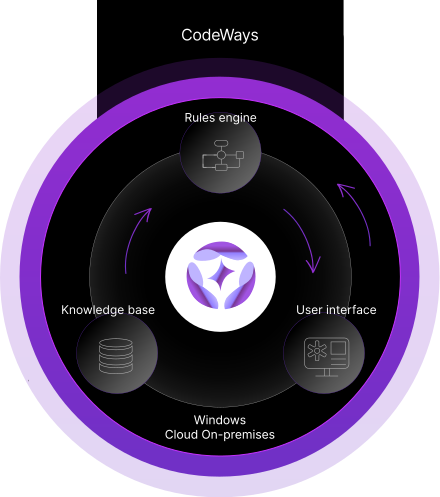
CodeWays is a tool for automated application conversion that translates code from one programming language to another automatically, while preserving the initial functionality of an app. Using an intelligent proprietary algorithm, the tool analyzes the syntax, semantics, mapping data types, control structures, function calls, and code structures that do not have equivalents in a target technology.
Based on the analysis, CodeWays applies all the relevant conversion rules from its knowledge base core and translates Delphi source code to C#.
It takes 5 min to start your application conversion journey!
App source code & App source code with embedded SQL*
- Informix4GL
- Delphi
- Cobol
- VisualBasic
- Progress4GL
- PowerBuilder
- C/C++
Any files with SQL code
- Informix
- Teradata
- SQLServer
- Oracle
- IBM DB2
- SAP Sybase
- PostgreeSQL
- MySQL
- Greenplum
- MariaDB
- Firebird
-
App target code
![App target code]()
-
App target code with converted ESQL
![App target code with converted ESQL]()
-
Files with SQL code for the target DB
![Files with SQL code for the target DB]()


*Embedded SQL are SQL statements written inline with the program source code, of the host language.
Convert Smarter. Evolve Faster
Over 400+ ways to migrate- Delphi
- Cobol
- Progress 4GL
- C#
- PowerBuilder
- C\C++
- Pascal
- .Net
- Informix 4GL
- Python
- Delphi
- Cobol
- Progress 4GL
- C#
- PowerBuilder
- C\C++
- Pascal
- .Net
- Informix 4GL
- Python
- Delphi
- Cobol
- Progress 4GL
- C#
- PowerBuilder
- C\C++
- Pascal
- .Net
- Informix 4GL
- Python
- Delphi
- Cobol
- Progress 4GL
- C#
- PowerBuilder
- C\C++
- Pascal
- .Net
- Informix 4GL
- Python
Check out how Ispirer Toolkit automatically converts Delphi application
Delphi to C# conversion service overview
More than 2K users use this way to
successfully convert their application code
Start
Assessment
- Collecting info about an application
- Analyzing the application and its components
- Making migration plan
Automated APP conversion
- Entire APP conversion
- APP changes (API, ESQL)
- Tool configuration and customization for specific APP
Manual APP conversion
- Manual code review and debugging
- Replacing custom controls, libraries, methods, etc. with analogues
- Developing remaining solutions using target technology
Functional testing
- APP analysis and test documentation creation
- Testing the application against test documentation
- Fixing issues
Acceptance testing
- Testing the APP against business requirements
- Fixing issues
Cutover
- Switching APP
- System startup assisstance
Conversion Samples of Delphi to C# WinForms
Ispirer Toolkit analyzes all object dependencies during the conversion process and provides not only line-by-line conversion, but resolves type conversions as well. The software understands and transforms the necessary inheritance dependencies. It parses the entire source code, builds an internal tree with all the information about the objects, and uses it in the migration process.
-
Variables declaration conversion:
Delphi
- var CanClose: Boolean;
- CustNo: Double;
- DBPath: string;
- Key: Char;
- I: Integer;
- RSCON: TIniFile;
→ C# WinForms
- bool CanClose;
- double CustNo;
- string Dbpath;
- char Key;
- int I;
- IniFile RSCON = null; //class IniFile implemented in AdditionalClasses
-
.pas file structure conversion:
Delphi
- unit Splash;
- interface
- uses
- SysUtils, Windows, Messages, Classes, Graphics, Controls,
- Forms, Dialogs, StdCtrls, ExtCtrls;
- type
- TSplashForm = class(TForm)
- Panel1: TPanel;
- Label3: TLabel;
- Bevel1: TBevel;
- Label1: TLabel;
- Image1: TImage;
- end;
- var
- SplashForm: TSplashForm;
- implementation
- end.
→ C# WinForms
- using System;
- using System.IO;
- using System.Data;
- using System.Drawing;
- using System.Windows;
- using System.Windows.Forms;
- using System.Collections.Generic;
- namespace Splash
- {
- public partial class TSplashForm : Form
- {
- public TSplashForm()
- {
- InitializeComponent();
- }
- }
- public partial class SplashUnit
- {
- public static TSplashForm SplashForm { get; set; } = new TSplashForm();
- }
- }
-
.dfm file structure conversion:
Delphi
- object SplashForm: TSplashForm
- Left = 204
- Top = 123
- AutoScroll = False
- ActiveControl = Panel1
- BorderIcons = []
- BorderStyle = bsNone
- ClientHeight = 178
- ClientWidth = 168
- Font.Color = clBlack
- Font.Height = -11
- Font.Name = 'MS Sans Serif'
- Font.Style = []
- PixelsPerInch = 96
- Position = poScreenCenter
- TextHeight = 13
- object Panel1: TPanel
- Left = 0
- Top = 0
- Width = 168
- Height = 178
- Align = alClient
- BevelInner = bvLowered
- Color = clSilver
- TabOrder = 0
- object Label3: TLabel
- Left = 23
- Top = 125
- Width = 123
- Height = 19
- Caption = 'Marine Adventures'
- Font.Color = clBlack
- Font.Height = -16
- Font.Name = 'Times New Roman'
- Font.Style = [fsItalic, fsUnderline]
- ParentFont = False
- end
- object Bevel1: TBevel
- Left = 10
- Top = 150
- Width = 147
- Height = 2
- Style = bsRaised
- end
- object Label1: TLabel
- Left = 60
- Top = 158
- Width = 47
- Height = 13
- Caption = 'Loading...'
- end
- object Image1: TImage
- Left = 40
- Top = 11
- Width = 87
- Height = 113
- Picture.Data = {
- }
- end
- end
- end
→ C# WinForms
- namespace Splash
- {
- partial class TSplashForm
- {
- /// <summary>
- /// Required designer variable.
- /// </summary>
- private System.ComponentModel.IContainer components = null;
- /// <summary>
- /// Clean up any resources being used.
- /// </summary>
- /// <param name="disposing">true if managed resources should be disposed; otherwise, false.</param>
- protected override void Dispose(bool disposing)
- {
- if (disposing && (components != null))
- {
- components.Dispose();
- }
- base.Dispose(disposing);
- }
- #region Windows Form Designer generated code
- /// <summary>
- /// Required method for Designer support - do not modify
- /// the contents of this method with the code editor.
- /// </summary>
- private void InitializeComponent()
- {
- System.ComponentModel.ComponentResourceManager resources = new System.ComponentModel.ComponentResourceManager(typeof(TSplashForm));
- this.Panel1 = new System.Windows.Forms.Panel();
- this.Label3 = new System.Windows.Forms.Label();
- this.Bevel1 = new System.Windows.Forms.Panel();
- this.Label1 = new System.Windows.Forms.Label();
- this.Image1 = new System.Windows.Forms.PictureBox();
- this.Panel1.SuspendLayout();
- ((System.ComponentModel.ISupportInitialize)(this.Image1)).BeginInit();
- this.SuspendLayout();
- //
- // Panel1
- //
- this.Panel1.Controls.Add(this.Label3);
- this.Panel1.Controls.Add(this.Bevel1);
- this.Panel1.Controls.Add(this.Label1);
- this.Panel1.Controls.Add(this.Image1);
- this.Panel1.Location = new System.Drawing.Point(0, 0);
- this.Panel1.Name = "Panel1";
- this.Panel1.Size = new System.Drawing.Size(168, 178);
- this.Panel1.TabIndex = 0;
- //
- // Label3
- //
- this.Label3.AutoSize = true;
- this.Label3.Font = new System.Drawing.Font("Times New Roman", 8.25F, ((System.Drawing.FontStyle)((System.Drawing.FontStyle.Italic | System.Drawing.FontStyle.Underline))));
- this.Label3.ForeColor = System.Drawing.Color.Black;
- this.Label3.Location = new System.Drawing.Point(23, 125);
- this.Label3.Name = "Label3";
- this.Label3.Size = new System.Drawing.Size(94, 14);
- this.Label3.TabIndex = 0;
- this.Label3.Text = "Marine Adventures";
- //
- // Bevel1
- //
- this.Bevel1.Location = new System.Drawing.Point(10, 150);
- this.Bevel1.Name = "Bevel1";
- this.Bevel1.Size = new System.Drawing.Size(147, 2);
- this.Bevel1.TabIndex = 1;
- //
- // Label1
- //
- this.Label1.AutoSize = true;
- this.Label1.Font = new System.Drawing.Font("Microsoft Sans Serif", 8.25F);
- this.Label1.Location = new System.Drawing.Point(60, 158);
- this.Label1.Name = "Label1";
- this.Label1.Size = new System.Drawing.Size(54, 13);
- this.Label1.TabIndex = 2;
- this.Label1.Text = "Loading...";
- //
- // Image1
- //
- this.Image1.Image = ((System.Drawing.Image)(resources.GetObject("Image1.Image")));
- this.Image1.Location = new System.Drawing.Point(40, 11);
- this.Image1.Name = "Image1";
- this.Image1.Size = new System.Drawing.Size(87, 113);
- this.Image1.TabIndex = 3;
- this.Image1.TabStop = false;
- //
- // TSplashForm
- //
- this.AutoScaleDimensions = new System.Drawing.SizeF(6F, 13F);
- this.AutoScaleMode = System.Windows.Forms.AutoScaleMode.Font;
- this.BackgroundImageLayout = System.Windows.Forms.ImageLayout.None;
- this.ClientSize = new System.Drawing.Size(169, 179);
- this.Controls.Add(this.Panel1);
- this.ForeColor = System.Drawing.Color.Black;
- this.FormBorderStyle = System.Windows.Forms.FormBorderStyle.None;
- this.Name = "TSplashForm";
- this.Padding = new System.Windows.Forms.Padding(204, 123, 0, 0);
- this.StartPosition = System.Windows.Forms.FormStartPosition.CenterScreen;
- this.Text = "SplashForm";
- this.Panel1.ResumeLayout(false);
- this.Panel1.PerformLayout();
- ((System.ComponentModel.ISupportInitialize)(this.Image1)).EndInit();
- this.ResumeLayout(false);
- }
- #endregion
- private System.Windows.Forms.Panel Panel1;
- private System.Windows.Forms.Label Label3;
- private System.Windows.Forms.Panel Bevel1;
- private System.Windows.Forms.Label Label1;
- private System.Windows.Forms.PictureBox Image1;
- }
- }
-
If statement conversion:
Delphi
- if FromEdit.Text = '' then Result := 0
- else Result := StrToDate(FromEdit.Text);
→ C# WinForms
- if (FromEdit.Text == string.Empty)
- {
- getFromDate_result = DateTime.FromOADate(0);
- }
- else
- {
- getFromDate_result = Convert.ToDateTime(FromEdit.Text);
- }
-
For statement conversion:
Delphi
- for I := 0 to Application.ComponentCount - 1 do
- begin
- if Application.Components[I] is TForm then
- begin
- F := TForm(Application.Components[I]);
- if (F <> Self) and (F.Visible) then F.Close;
- end;
- end;
→ C# WinForms
- for (I = 0; I <= this.Controls.Count - 1; I++)
- {
- if (this.Controls[I] is Form)
- {
- F = ((Form)(this.Controls[I] as object));
- if ((F != this) && (F.Visible))
- {
- F.Close();
- }
- }
- }
-
While statement conversion:
Delphi
- while not Items.EOF do
- Items.Delete;
→ C# WinForms
- while (!Items.EOF)
- {
- Items.Delete();
- }
-
Try catch statement conversion:
Delphi
- try
- Items.First;
- finally
- DeletingItems := False;
- end;
→ C# WinForms
- try
- {
- Items.MoveFirst();
- }
- finally
- {
- DeletingItems = false;
- }
Get a free sample code of our Delphi to C# WinForms code conversion
Ispirer Toolkit automatically converts not only a single piece of code, but an entire application. Complex code will require customization of the toolkit
They succeeded using Ispirer Toolkit
Transportation firm expands software with Ispirer Service

Project Scope
600 000 LoC
Project Duration
11 Months
Industry
Transportation and defense corporation
Cut migration effort in half for automotive supplier

Project Scope
400 000 LoC
Project Duration
12 Months
Industry
Automotive Products Supplier
Automated modernization of a legacy enterprise system
Project Scope
1 800 000 LoC
Project Duration
15 Months
Industry
Pharmacy system provider
Faster, cleaner, and more stable application after modernization
Project Scope
275 000 LoC
Project Duration
14 Months
Industry
Independent Software Vendor
Trust us with your conversion project
-
Seasoned team
Ensuring high security and performance standards is what we do best, thanks to our impressive expertise in building reliable and scalable solutions.
-
Technology expertise with 25+ years of experience
Our team has gained a wide pool of expertise in various programming languages, from the rarest to the most popular ones.
-
We comply with ISO 27001 security
We comply with ISO 27001 security management requirements with comprehensive policies and processes, advanced security technology, and skilled professionals.
-
Proprietary tools
We employ Ispirer proprietary tools, underscoring our dedication to delivering the utmost reliability and performance solutions.
The toolkit is compiled daily and continually integrates dozens of new conversion rules, enhancing the automation capabilities.
They chose Ispirer to revamp their application
Epicor, University of Maryland, Splice Machine and more have adopted CodeWays to boost their innovation life-cycle accelerate and manage their end-to-end innovation lifecycle



Progress ABL to C#
Migration project
50%
Migration time reduction
2 MLN
Lines of code
75%
Аutomation achieved
Enterprise software
"We have found the Ispirer team to be knowledgeable and responsive, and we have found the tooling to be flexible enough to be easily adapted to our coding conventions."
COBOL to Java
Migration project
6-month
Migration time reduction
100K+
Lines of code
200+
COBOL programs
Education
"Ispirer Toolkit enabled us to efficiently convert 200 COBOL programs with over 100,000 lines of code to Java. The tool produced high-quality, maintainable code, allowing our team to focus on infrastructure rather than conversion. Ispirer’s support was exceptional, often resolving issues within one business day."
Informix 4GL to Oracle PL/SQL
Migration project
95%
Аutomation achieved
200K+
Lines of code
75%
Migration time reduction
IT Services
"Ispirer provided a full-cycle migration service, converting over 200,000 lines of Informix 4GL to Oracle PL/SQL with 95% automation. Their expertise, customizations, and commitment to quality ensured a seamless transition. We highly recommend Ispirer for complex migration projects."
Oracle PL/SQL to Java
Migration project
80%
Аutomation achieved
400K+
Lines of code
50%
Migration time reduction
Database technology
"At the onset of the engagement, the Ispirer MnMTK was expanded to meet the specific requirements of our migration prior to being delivered for our use. Once this phase of the project was complete, we were provided with the expanded toolkit."
C/C++, AutoLISP to C#.NET
Migration project
70%
Аutomation achieved
250K+
Lines of code
50%
Migration cost reduction
Civil engineering and infrastructure
"We were impressed with the knowledge, professionalism, hard work, and enthusiasm of the Ispirer team. Through this Migration Project, we have a solid base for further expanding our application."
Borland Delphi 7.0 modernization
Migration project
75%
Аutomation achieved
20K
Lines of code
50%
Migration time reduction
Automation Equipment
"We had an old Borland Delphi 7.0 project, which was brought back to life. Ispirer had offered us a timely and financially attractive conversion of the application. The work was performed promptly."
Frequently Asked Questions
Want more details?
Request a consultation with our expert
Is Delphi faster than C#?
Delphi and C# show similar performance in most business applications. Delphi can be faster in some low-level tasks, while C# benefits from the optimized .NET runtime and modern execution model.
When developers move from Delphi to C#, performance usually stays stable or improves due to better architecture, tooling, and platform support rather than language-level differences.
What are the key business reasons to migrate from Delphi to C#?
The main reason to migrate Delphi to C# is modernization. C# provides access to the .NET ecosystem, cloud services, and a larger pool of developers, which reduces long-term risks and costs.
Scenarios such as C# to Delphi are uncommon and typically related to legacy or highly specific environments rather than strategic growth.
What is the typical timeline for a Delphi to C# migration using Ispirer Toolkit?
A Delphi to C# conversion timeline depends on application size and complexity. Smaller systems can be migrated in days, while large enterprise applications usually take several weeks including testing.
Automated tools significantly reduce effort compared to attempts to manually convert code from Delphi to C#.
How much of the Delphi code can be fully automated during conversion?
In most projects, 70–90% of the source code can be automated during migration. This includes core logic, data access, and standard language constructs.
Automation levels for converting C# to Delphi are usually much lower, which makes forward migration a more practical option.
What tools are included in the Ispirer Ecosystem for Delphi to C# migration?
The Ispirer Ecosystem includes the Metrics tool for application analysis and project estimation. It helps teams understand scope, risks, and timelines before migration starts.
CodeWays performs automated transformation and delivers clean, maintainable C# code ready for further development and long-term support.
Are you still here? And wow, that's quite a lot you had to scroll through! 😄
Take control of your application
conversion now